A real local application.
Your daily package workflow runs on the station, even without Internet.
YOUR PACKAGE ROOM. CONNECTED TO THE PROOF.
Receive it. Route it. Get the signature.
Keep the record—right on your PC.
SKUmbrella brings receiving, internal delivery and package accountability together in one native Windows application. A complete station, with support directly from the people behind it.
Complete kits from $8,999Up to 3 years of direct warranty coverage SKUmbrella / Operations•••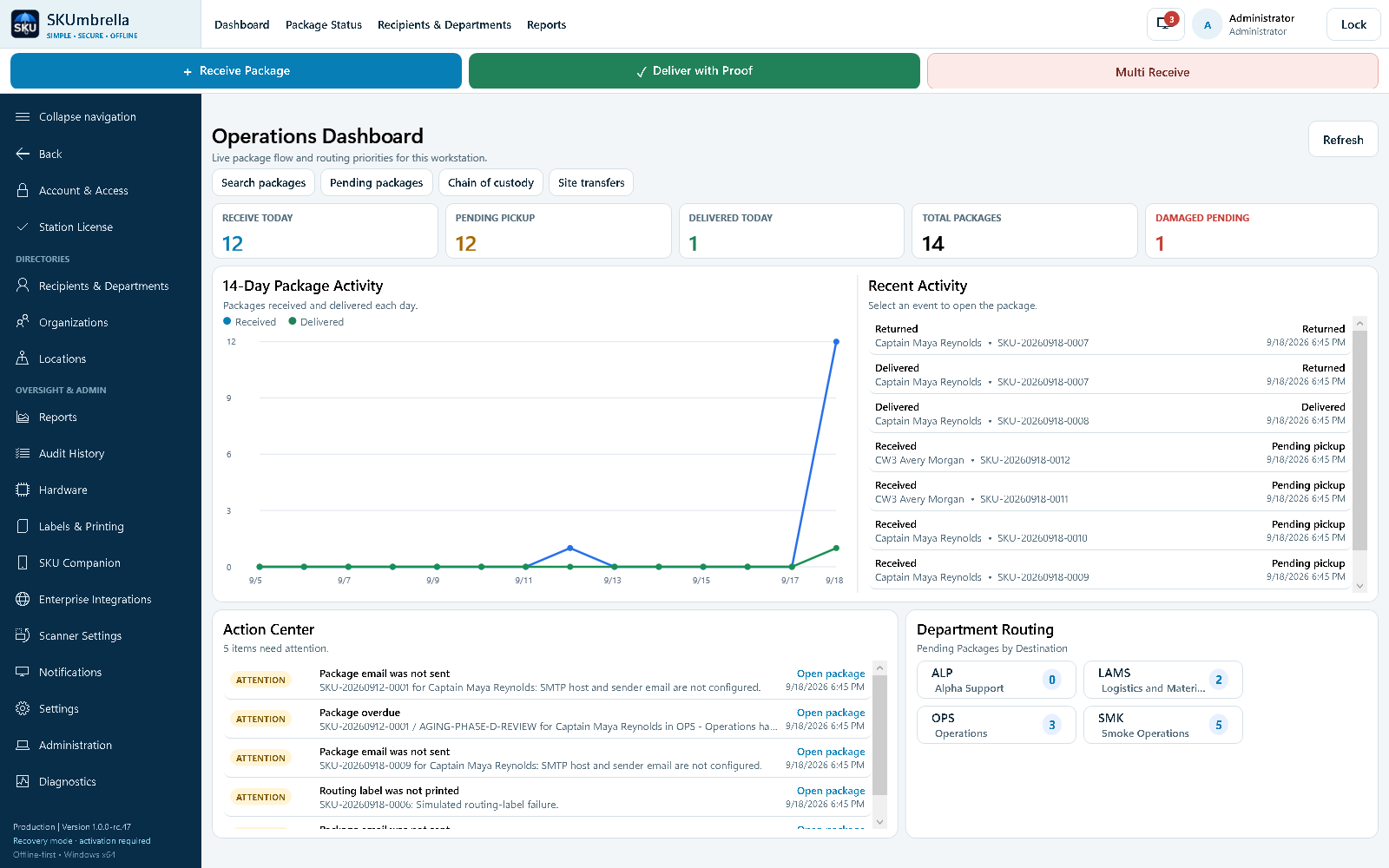
Your daily package workflow runs on the station, even without Internet.
From tracking number and department to receiver, signature and history.
A one-time local license. Hardware and support options defined in your quote.

BUILT AROUND ACCOUNTABILITY
01 / THE DAILY WORKFLOW
SKUmbrella tracks what happens inside your organization—who the package is for, where it goes and who receives it.
STEP 01 / 04
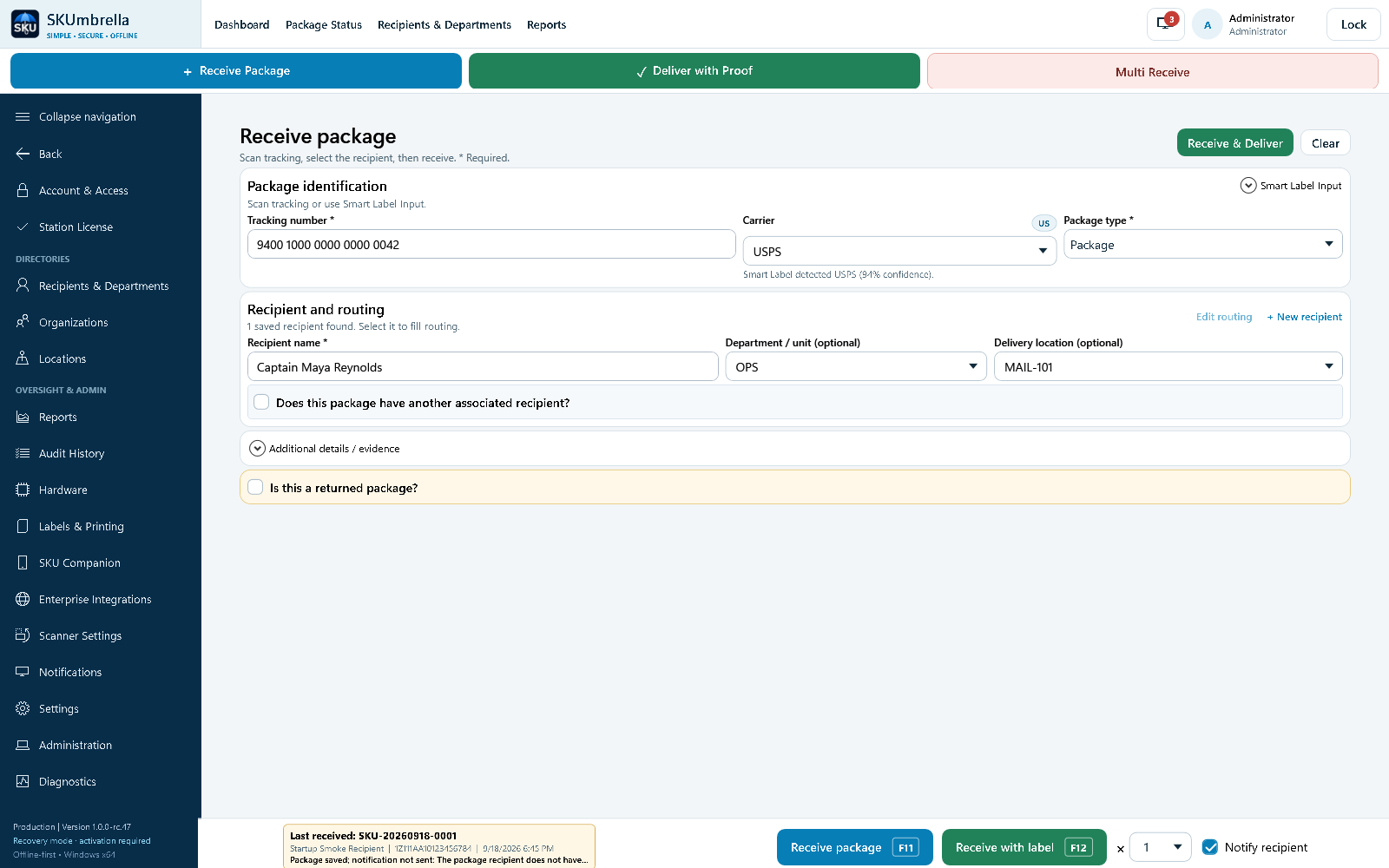
Scan a barcode or enter the tracking number. Add the recipient, department and internal delivery location, then save the receipt—with a routing label when you need one.
Recipient already waiting? Receive & Deliver opens signature capture right from receiving.
02 / THE RECORD YOU KEEP
Your team builds a searchable history as it works. The information and evidence you enter stay connected to the package.
Find the package and understand where it belongs.
Keep the details that explain the handoff.
Reuse the information your team has already entered.
Follow what happened instead of reconstructing it.
Saved locally. Available when you need it. Search records, review evidence and prepare reports from your station. Make separate recovery copies to protect against a lost or failed PC.
03 / CONTROL & CONTINUITY
Core operations do not depend on a vendor cloud, an Internet connection or a connection to a government network.
Choose how your team signs in, manage permissions and keep recovery media under your organization’s control.
Use named accounts with Admin and Operator permissions, or configure shared-station access. Named accounts provide individual attribution; shared access records the shared station.
Package actions retain custody events and timestamps. Corrections keep their reasons and before/after values, helping your team explain changes.
Create a recovery package with records and evidence. Save it to separate storage, then import a validated copy when rebuilding a station.
Local storage is not a guarantee against theft, disk failure or unauthorized access. Protect the Windows PC, control access to backup media and verify your recovery copies. Moving to another PC may require activation, credential setup and device pairing.
Email notifications require a configured mail service. Companion sync requires an approved connection to the paired station. Agency approval and network rules still apply to connected equipment.
SKU Companion04 / SKU COMPANION
Use a compatible Android device to receive, find and deliver packages away from the desk.
Photograph a label to extract tracking and recipient text. A clear match with a saved contact can help fill the department. The operator reviews the result.
Collect a signature and supporting photos from the handheld, while keeping the work attached to the delivery.
Work is queued locally when the station is unreachable. Companion attempts synchronization when connectivity returns or the app resumes; Sync now is also available.
Companion is currently in beta. Device compatibility and setup must be confirmed for your deployment. Recognition depends on label clarity; automatic results should be checked.
05 / A COMPLETE LOCAL WORKSTATION
Build the station around the work: a Windows PC, compatible scanning, labels, signature capture and separate backup storage.
YOUR COMPLETE STATION STARTS HERE
Software and equipment for receiving, tracking and documented delivery—brought together in one quoted package.
$8,999 USD
Essential kit · 1-year hardware coverage
Get your kit quotationOne-time local software license. No required monthly subscription. Final equipment, shipping and applicable taxes are confirmed in your quotation.DIRECT COVERAGE. ONE POINT OF CONTACT.
We supply your station and handle its covered hardware faults. No third-party warranty provider. No manufacturer-to-manufacturer runaround during your coverage term.
1 year
Direct hardware coverage2 years
Direct hardware coverage3 years
Direct hardware coverageReplacement for covered hardware failures under normal use, replacement configuration, and covered return and replacement shipping. Software and supported driver updates are included throughout your purchased term.
Contact SKUmbrella with the issue. We review the fault and coordinate the covered replacement and return arrangements directly with you. Service timing is confirmed for your situation.
Coverage is provided directly by SKUmbrella LLC for the purchased 1-, 2- or 3-year term. Accidental damage, misuse and operation outside equipment specifications are excluded. Data recovery depends on a valid backup and is not guaranteed. No universal next-day replacement is promised. After the SKUmbrella coverage term, the customer handles any remaining manufacturer warranty. The official quotation and accepted terms define the complete agreement.
A CLEAR PATH TO YOUR FIRST PACKAGE
Know what you are buying, what is covered and what your team needs before the equipment arrives.
Share your package volume, workspace and purchasing requirements. We walk you through the receiving and delivery workflow.
Review the kit contents, coverage term, total price and delivery arrangements. Use the quotation in your organization’s purchasing process.
Connect the supplied equipment using the setup instructions. Confirm activation, scanning, label printing and backups before your first live receipt.

GOVERNMENT PURCHASING
SKUmbrella LLC
Buying for a government organization? Tell us what your purchasing office needs in the quote. Equipment and network approvals remain with your organization.
Request an official quotationA FEW PRACTICAL ANSWERS
Have a workflow or equipment question?
Ask us directly.
SKUmbrella is a native Windows application for the part of delivery that happens inside your organization: receiving a carrier’s package, routing it to the right person or department, recording pickup or delivery, and keeping the proof. It manages your internal package room; it does not replace the carrier’s tracking service.
Core desktop receiving, delivery, signatures, labels, search and records work locally without an Internet connection or a connection to a government network. Device use and deployment remain subject to your organization’s approval. Optional email notifications need an approved mail service, and Companion synchronization needs an approved local connection to the station.
Package records and delivery evidence are saved on the station. Companion keeps its pending work locally until it can synchronize with the paired PC. The core workflow does not require uploading package data to a vendor cloud. Your team controls the station and the recovery copies it creates.
Create a recovery package containing operational records and evidence, and save it to separate storage. Import a valid recovery package when rebuilding or moving a station. Import replaces the destination records rather than merging two stations; a verified safety copy is created first. Activation, Windows-protected credentials and device pairing may need to be configured again on another PC. Recovery depends on a usable backup; a backup drive is not a guarantee against data loss.
When configured by an administrator, a linked CAC barcode can support Scan & Go sign-in. This is barcode-based account identification, not CAC chip or certificate authentication and not multifactor authentication. Named accounts and Admin/Operator permissions are available; shared-station access is also configurable.
The quoted local station license is a one-time purchase with no required monthly subscription for the included local workflow. Free software and supported driver updates are included for the purchased coverage term. Hardware, coverage duration and complete terms are defined in your unit’s quotation.
The customer connects and sets up the supplied plug-and-play equipment using the provided instructions. During the purchased hardware coverage term, SKUmbrella is your point of contact for covered faults. Accidental damage is excluded. Replacement arrangements, shipping, compatibility and service timelines are agreed for each unit; no universal next-day delivery is promised.
LET’S LOOK AT YOUR WORKFLOW
Tell us about your package room. We’ll walk through the software, equipment and coverage that fit your operation.